
See also README in hw2 repo for commands.
2.1.3 End-to-End Benchmarking
Q: 写 benchmark 脚本:按超参建 Transformer,生成随机 batch,支持 forward only、forward+backward、forward+backward+optimizer step。每步后 torch.cuda.synchronize()。
对表中模型大小,用 5 warmup steps,测 10 measurement steps,报告均值/标准差。再测无 warmup、1 warmup、2 warmup。
A: | small | 768 | 3072 | 12 | 12 |
→(mean, std) ↓(forward, for+back, for+back+opt)
1(np.float64(0.0545499186962843), np.float64(9.301123529883161e-05))2(np.float64(0.230664774030447), np.float64(0.020122250377148584))3(np.float64(0.24185883365571498), np.float64(0.030474347009177154))| medium | 1024 | 4096 | 24 | 16 |:
1(np.float64(0.16028596945106982), np.float64(0.00011035529741210624))2(np.float64(0.6570748724043369), np.float64(0.03049904281007697))3(np.float64(0.6851631578058004), np.float64(0.03967747669197852))| large | 1280 | 5120 | 36 | 20 |:
1(np.float64(0.3304705709218979), np.float64(0.0023439186241350617))2(np.float64(1.3425680793821813), np.float64(0.04551350800571191))3(np.float64(1.3851026877760888), np.float64(0.036186751000143125))| xl | 2560 | 10240 | 32 | 32 |: 换成了 H200. 初始化很慢,大概要 30s,print 了一下发现没有瓶颈就是慢.
1(np.float64(0.37269446402788164), np.float64(0.020297942534701095))2(np.float64(1.3736595837865024), np.float64(0.020598247928436356))3(np.float64(1.4584950204007328), np.float64(0.043012806955922626))| 10B | 4608 | 12288 | 50 | 36 |: 爆显存.
warmup: medium 模型. H200
1--warmup 0 --outer 10 --inner 12(np.float64(0.330410421686247), np.float64(0.08759358961566299))3# 即使销毁模型,只要进程没销毁,warmup 就持续有效.4
5--warmup 0 --outer 1 --inner 16(np.float64(0.5848983488976955), np.float64(0.0))7(np.float64(0.7329192743636668), np.float64(0.0))8
9--warmup 1 --outer 1 --inner 110(np.float64(0.298882813192904), np.float64(0.0))11(np.float64(0.2970326286740601), np.float64(0.0))12
13--warmup 2 --outer 1 --inner 114(np.float64(0.2952738180756569), np.float64(0.0))15(np.float64(0.35315717151388526), np.float64(0.0))4 collapsed lines
16
17--warmup 5 --outer 1 --inner 118(np.float64(0.296027516014874), np.float64(0.0))19(np.float64(0.2957768542692065), np.float64(0.0))一次 & 多次 warmup 似乎没区别.
2.1.4 nsys
(我只用了 medium, context = 512.)
(a) What is the total time spent on your forward pass? Does it match what we had measured before with the Python standard library?
- forward: 约 250ms. 很 match (python 是 254ms).
(b) What CUDA kernel takes the most cumulative GPU time during the forward pass? How many times is this kernel invoked during a single forward pass of your model? Is it the same kernel that takes the most runtime when you do both forward and backward passes?
- forward 中,最耗时 ampere_sgemm_128x128_tn (49ms). 143 times.
- forward + backward 的话最耗时就是 backward 的 indexing_backward_kernel_stride_1 (149ms, 24 times)
(c) What other kernels besides matrix multiplies do you see accounting for non-trivial CUDA runtime in the forward pass?
- 主要是 ampere_sgemm_128x32_tn (49ms), write_indices (10.4ms), vectorized_elementwise_kernel (7.2ms)
(d) Profile running one complete training step with your implementation of AdamW. How does the fraction of time spent on matrix multiplication change, compared to doing inference (forward pass only)? How about other kernels?
- full step 相比 forward 矩乘占比明显降低. indexing_backward_kernel_stride_1 (梯度累加回原始张量)显著上升.
(e) Compare the runtime of the softmax operation versus the matrix multiplication operations within the self-attention layer of your model during a forward pass. How does the difference in runtimes compare to the difference in FLOPs?
- attn softmax 耗时 9ms. attn matmul 耗时 10ms. FLOPS 则是 4.29e9 vs 8.39e7(手算). 由于 softmax 不是矩阵乘法而是多次 log sum exp 运算,Arithmetic Intensity 很低.
2.1.5 mixed_precision_accumulation
Q: Run the following code and comment on the accuracy of the results.
- float32 直接计算全部,是 (10.0001) 用 float16 存储总和的精度非常糟糕 (9.9531). 用 float16 存储中间变量而 float32 存储总和就还行. (10.0021).
2.1.5 benchmarking_mixed_precision
1from torch import nn2class ToyModel(nn.Module):3 def __init__(self, in_features: int, out_features: int):4 super().__init__()5 self.fc1 = nn.Linear(in_features, 10, bias=False)6 self.ln = nn.LayerNorm(10)7 self.fc2 = nn.Linear(10, out_features, bias=False)8 self.relu = nn.ReLU()9 def forward(self, x):10 x = self.relu(self.fc1(x))11 x = self.ln(x)12 x = self.fc2(x)13 return x(a) Using autocast, what are the data types of:
- the model parameters within the autocast context? fp32
- the output of the first feed-forward layer (ToyModel.fc1)? input=[torch.float32], output=[torch.bfloat16]
- the output of layer norm (ToyModel.ln)? output=[torch.float32] 因为涉及均值和方差计算
- the model’s predicted logits? bf16
- the loss? fp32
- the model’s gradients? fp32
(b) What parts of layer normalization are sensitive to mixed precision? 均值和方差.
If we use BF16 instead of FP16, do we still need to treat layer normalization differently? Why or why not? 还是 FP32,因为方差对尾数也敏感 (例如方差可能很小)
(c) … Compare the results of using full precision versus mixed precision, and comment on any trends as model size changes.
nullcontext: 0.877, 0.191
autocast bf16: 0.481, 0.023
2.1.6
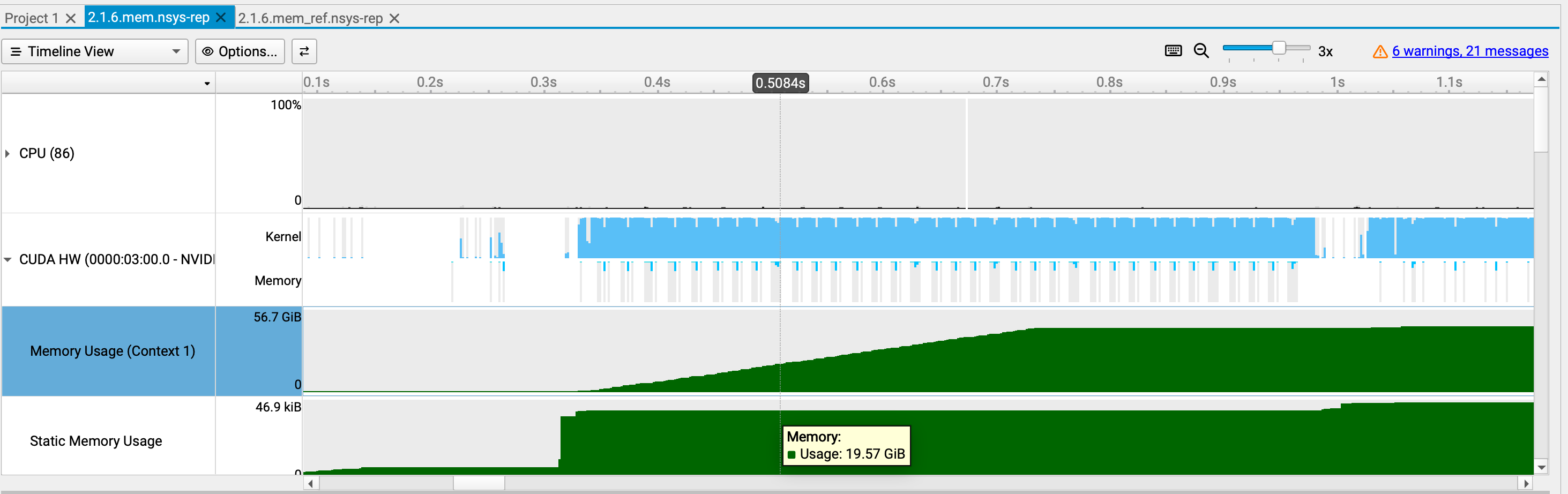
(a) What do your memory timelines look like? Can you tell which stage is running based on the peaks you see?
Deliverable: Two images of the “Active memory timeline” of an xl model, from the memory_viz tool: one for the forward pass, and one for running a full training step.
full 上下文 128: 我用了 large | 1280 | 5120 | 36 | 20 | 模型,上下文 128 & 1024.
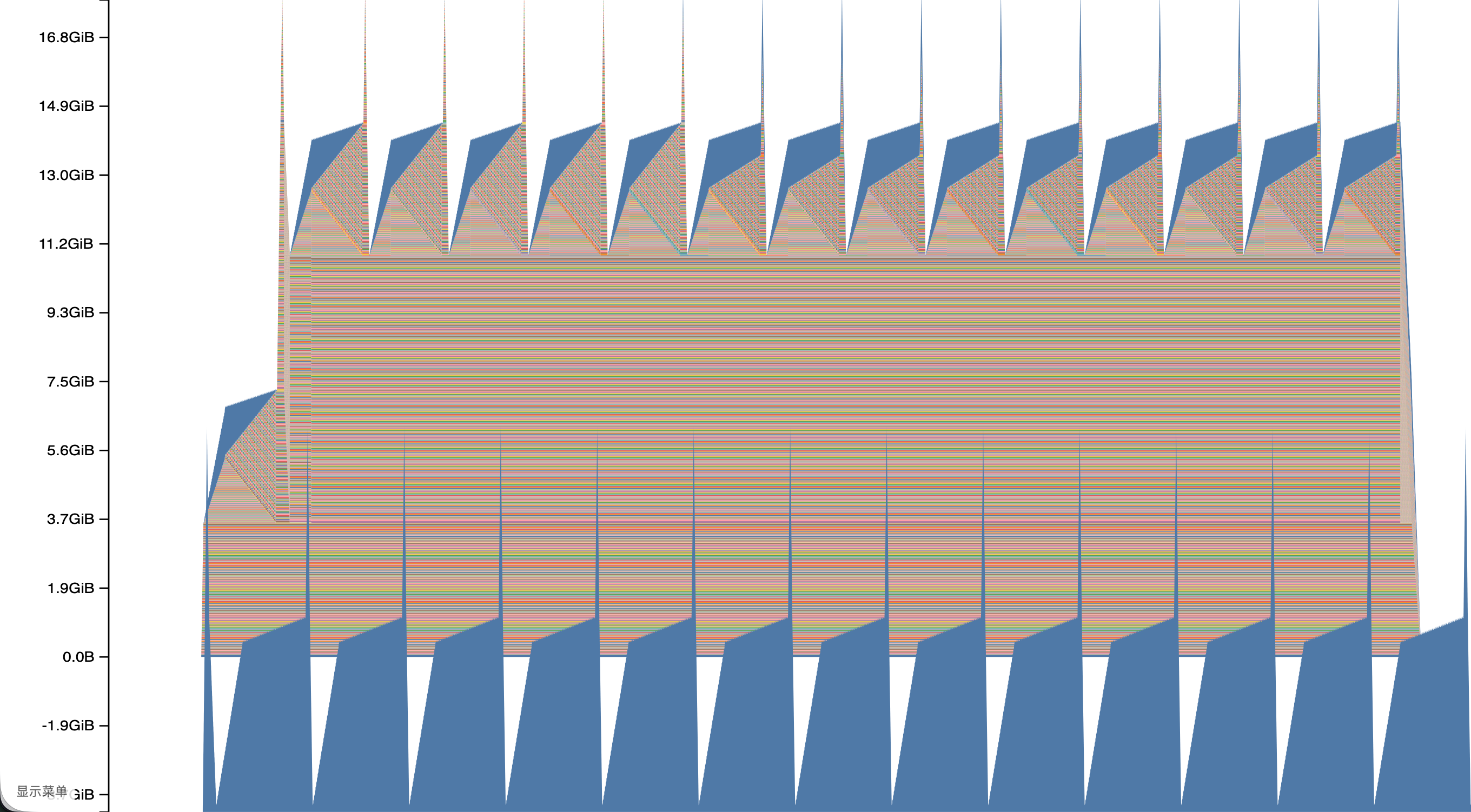
full 上下文 1024: 此图中尖端是 forward. 随着 backward 会逐渐释放.
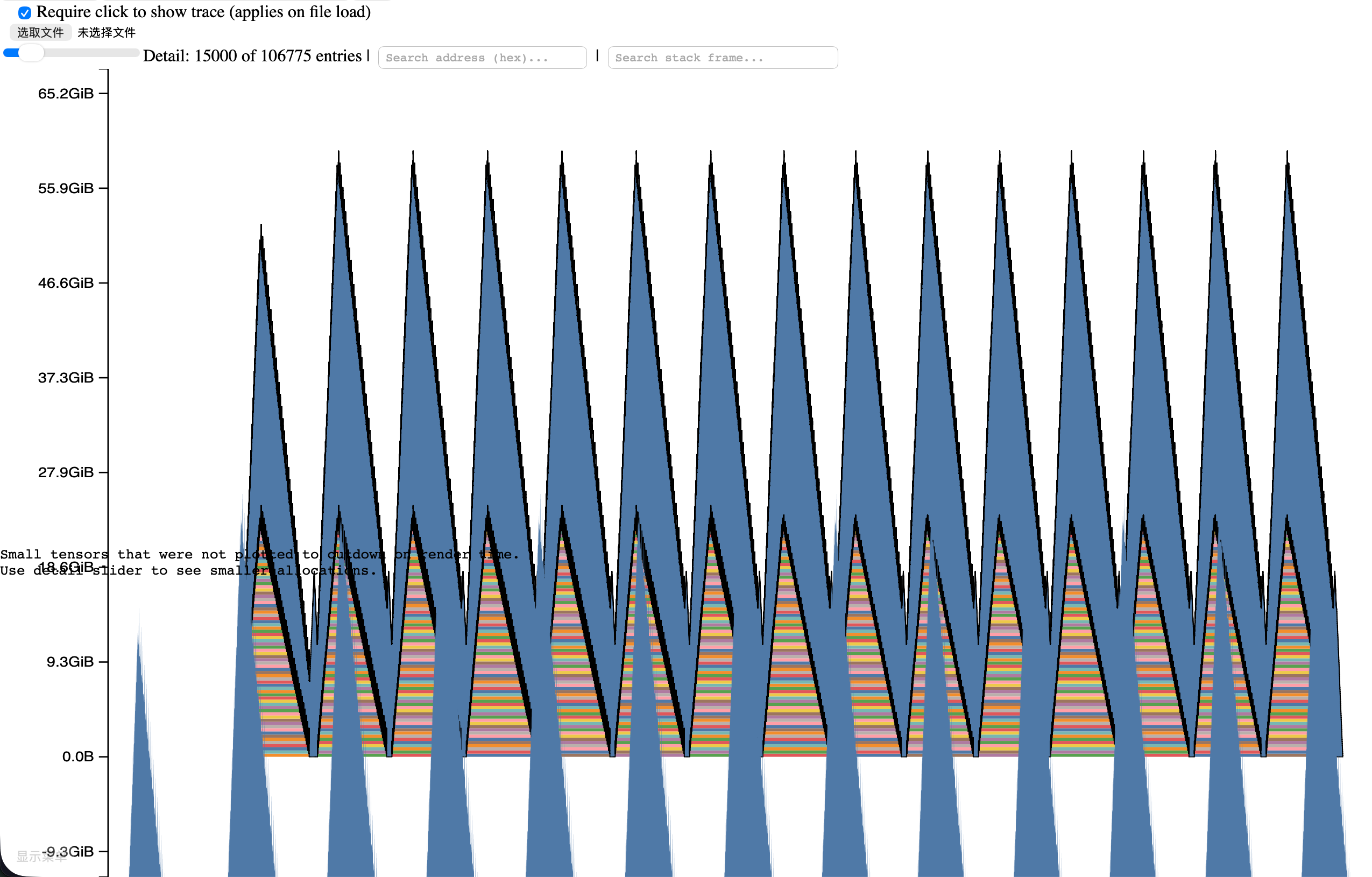
forward(no grad) 上下文 1024: 有无数尖峰.
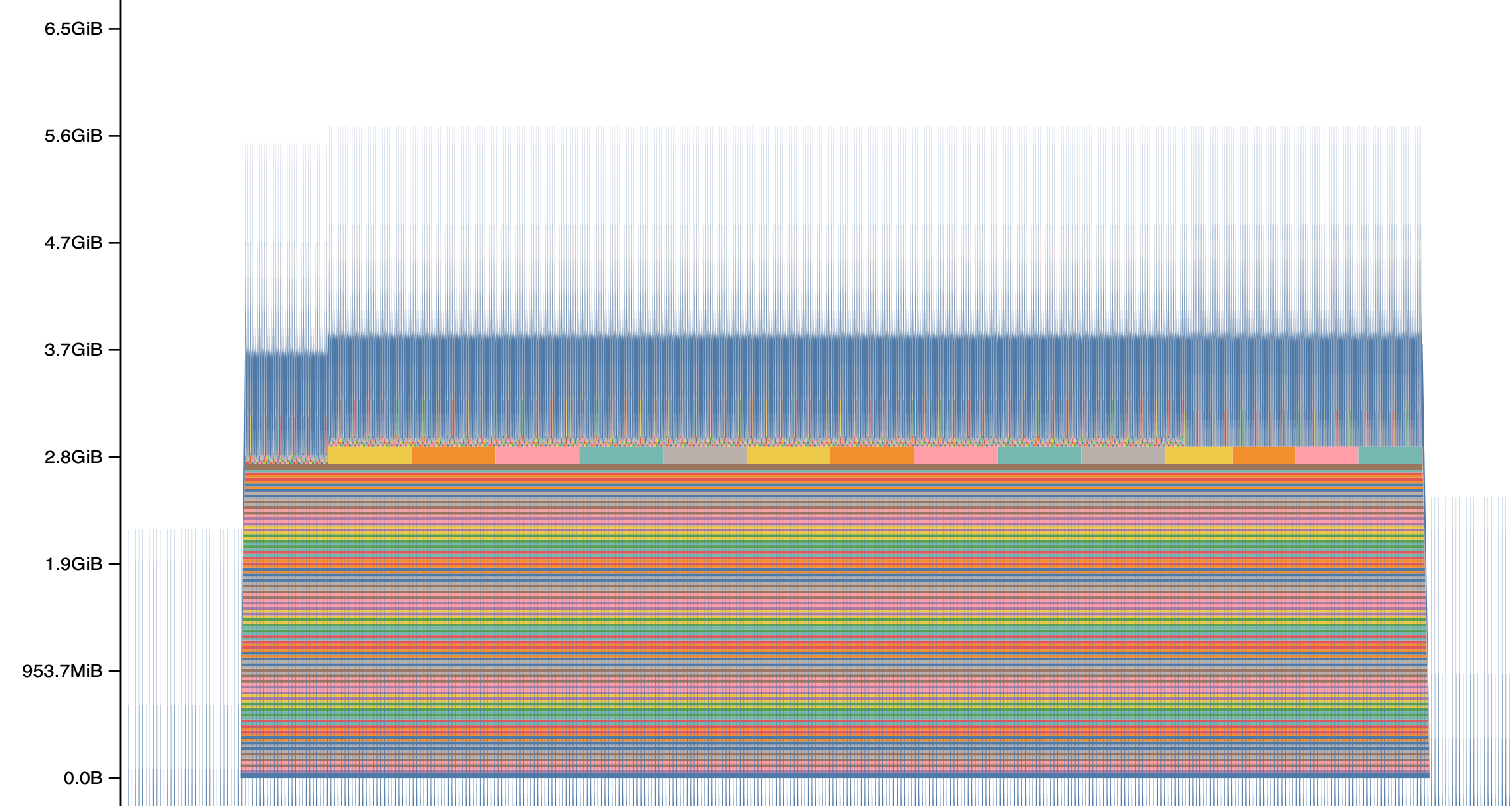
forward(no grad) 上下文 128:
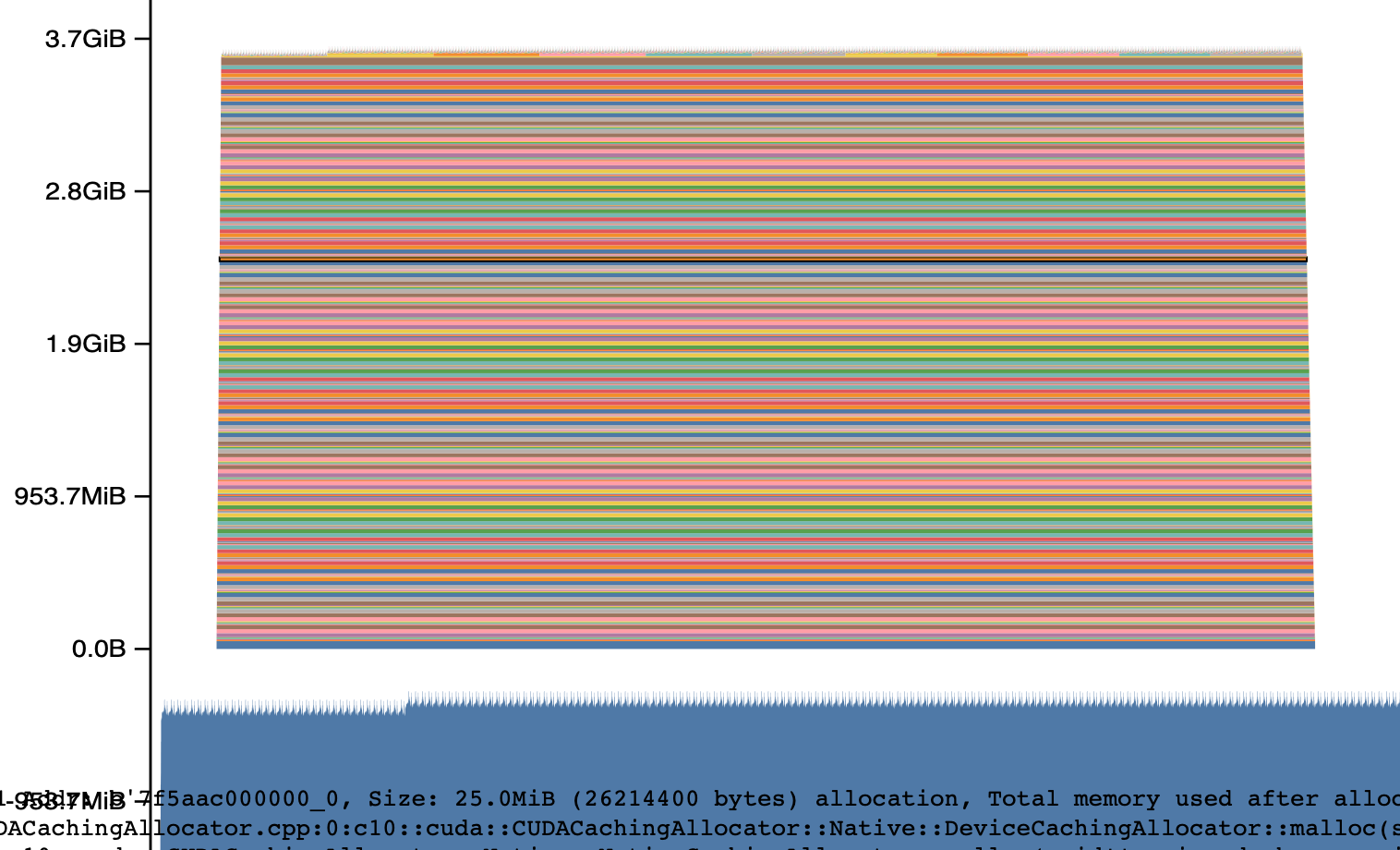
(b) What is the peak memory usage of each context length when doing a forward pass? What about when doing a full training step?
full step:
- context 128: 18G
- context 1024: 60G
forward no grad:
- context 128: 3.7G
- context 1024: 5.6G
(c) Does mixed-precision significantly affect memory usage?
- full: mix 50G. 普通 60G.
- forward: mix 5.3G. 普通 5.6G. 确实降低了很多
(d) What is the size of a tensor of activations in the Transformer residual stream, in single-precision?
考虑 large 模型. context 1024. [b=4, l=1024, d=1280] * 4 / 1024 / 1024 = 20MB
(e) What is the size of the largest allocations shown? Looking through the stack trace, can you tell where those allocations come from?
最大分配 1.2G. 主要是 scaled_dot_product_attention 中创建 attn. (这里找到个 bug,我把 mask expand_as attn 浪费了很多显存,修复后峰值显存 61.8G -> 58.6G)
(f) How much memory was allocated during the forward pass, and how much memory usage changes for every TransformerBlock in the backward pass, calculate how much memory the produced gradient tensors for a TransformerBlock take. Does the result match what you expect?
- 根据统计结果,with grad: 一个 transformer block forward: 20.83 - 19.54 = 1.29 GB
- 和期望结果 1244MB 差不多
| 保留项 | 显存 |
|---|---|
attention 的 exp 结果与 softmax 结果,各 (BHT^2) | (2\times320=640) MiB |
| RoPE 后的 Q、K 和 V | (3\times20=60) MiB |
attention 输出(供 output_proj backward) | 20 MiB |
SwiGLU 的 w1、w3、sigmoid、SiLU 输出、相乘结果 | (5\times80=400) MiB |
两个 RMSNorm 的输出及其 x / rms 中间值 | (4\times20=80) MiB |
| 两次 residual add 的结果 | (2\times20=40) MiB |
| mask、RoPE 查表结果、softmax argmax/denominator 等 | 约 4 MiB |
3 gradient checkpointing.
概述:常规情况下 forward 会保存所有中间计算结果,方便计算梯度,但是显存占用很大。我们可以选择保留仅部分位置的计算结果,其他中间值在 backward 过程中从保留位置开始重新 forward(称为 recomputing),这样的计算量大,但是保留显存小。
另一方面,保存的位置越少,重新 forward (with grad) 也会占用更多显存. 这需要平衡, “we want to balance the memory cost of the saved checkpoints with the memory cost of materializing a full block worth of residuals.”
Q:考虑一个由 (N) 个相同 Transformer block 顺序堆叠而成的模型。
(a) 忽略计算开销时,哪种 checkpoint 策略可以使峰值激活内存最小? A: 只 ckpt 第一个输入,然后 backward 过程中从第一个输入开始直接 no_grad forward 到需要的位置。计算量高达 O(N^2)
如果 backward 内的 forward 必须 with_grad,那么采取 N logN 策略。首次 forward 仅保存第一个 block 和 N / 2 + 1 个 block 的输入,而 backward 按照线段树规划,计算 block32 时保存 block16, 24, 28, 30, 31 的输入,这样峰值显存是 O(logN)
(b) 若你的时间/计算预算只允许进行一轮重计算(即不允许嵌套 checkpoint 调用),哪种 checkpoint 策略最能降低峰值内存? A: 均匀分块。
Profiling 我就跳过了。
4.1.1 & 4.2
- 目标:比较 torch.compile 开启与否.
- 实现:对 scaled_dot_product_attention 直接 torch.compile.
- 显存没有啥变化,而速度确实提升了 (80ms -> 53ms).
1implementation,d_model,sequence_length,status,forward_ms,backward_ms,memory_before_backward_mib2eager,16,256,ok,0.494212806224823,1.202208399772644,20.77343753eager,16,1024,ok,1.017722338438034,1.7754600942134857,82.343754eager,16,4096,ok,7.434218414127827,20.743196196854115,1048.6255eager,16,8192,ok,28.435785062611103,72.30912044644356,4129.06eager,16,16384,oom,,,7eager,32,256,ok,0.6705579534173012,1.0819567739963531,21.27343758eager,32,1024,ok,0.9723179414868355,1.8105434253811836,84.343759eager,32,4096,ok,7.604777291417122,20.279442258179188,1056.62510eager,32,8192,ok,29.081825651228428,74.41348228603601,4145.011eager,32,16384,oom,,,12eager,64,256,ok,0.3997109830379486,0.9170743450522423,22.273437513eager,64,1024,ok,0.8707667887210846,1.6564813256263733,88.3437514eager,64,4096,ok,9.433887861669064,20.308630242943764,1072.62515eager,64,8192,ok,33.36547423154116,75.28119631111622,4177.026 collapsed lines
16eager,64,16384,oom,,,17eager,128,256,ok,0.6183508783578873,1.092115044593811,24.273437518eager,128,1024,ok,0.8896416053175926,1.7290573567152023,96.3437519eager,128,4096,ok,9.267773926258087,22.57660310715437,1104.62520eager,128,8192,ok,35.500497706234455,80.74479296803474,4241.021eager,128,16384,oom,,,22compiled,16,256,ok,0.6144941225647926,1.2042122706770897,20.7812523compiled,16,1024,ok,1.1015325784683228,1.4572116360068321,82.37524compiled,16,4096,ok,4.909295029938221,12.961415499448776,1048.7525compiled,16,8192,ok,17.451394870877266,48.38921267539263,4129.2526compiled,16,16384,ok,90.07508214563131,181.8968455120921,16434.2527compiled,32,256,ok,0.8020976930856705,1.6922759264707565,21.2812528compiled,32,1024,ok,0.7085940986871719,2.3575184494256973,84.37529compiled,32,4096,ok,5.678342022001743,13.854017481207848,1056.7530compiled,32,8192,ok,18.914518505334854,46.66732594370842,4145.2531compiled,32,16384,ok,93.62432647496462,187.08102118223906,16466.2532compiled,64,256,ok,0.662848949432373,1.055193468928337,22.2812533compiled,64,1024,ok,0.766071267426014,1.3308187201619148,88.37534compiled,64,4096,ok,5.932997204363346,14.40148152410984,1072.7535compiled,64,8192,ok,22.357851788401604,47.924527674913406,4177.2536compiled,64,16384,ok,101.80162202566862,196.10814217478037,16530.2537compiled,128,256,ok,0.4187128320336342,1.0392731055617332,24.2812538compiled,128,1024,ok,1.1319655552506447,1.670658104121685,96.37539compiled,128,4096,ok,7.801861874759197,14.480017572641373,1104.7540compiled,128,8192,ok,25.341377183794975,53.71620986610651,4241.2541compiled,128,16384,ok,119.51537825167179,212.54593744874,16658.25目标:直接对我手写的 transformer 比较 compile 与否:
1运行时间 mean, std:2implementation=eager (np.float64(0.2992304939776659), np.float64(0.1388287491283957))3implementation=compiled (np.float64(0.2345106636174023), np.float64(0.014627779890749587))4似乎快了20%.